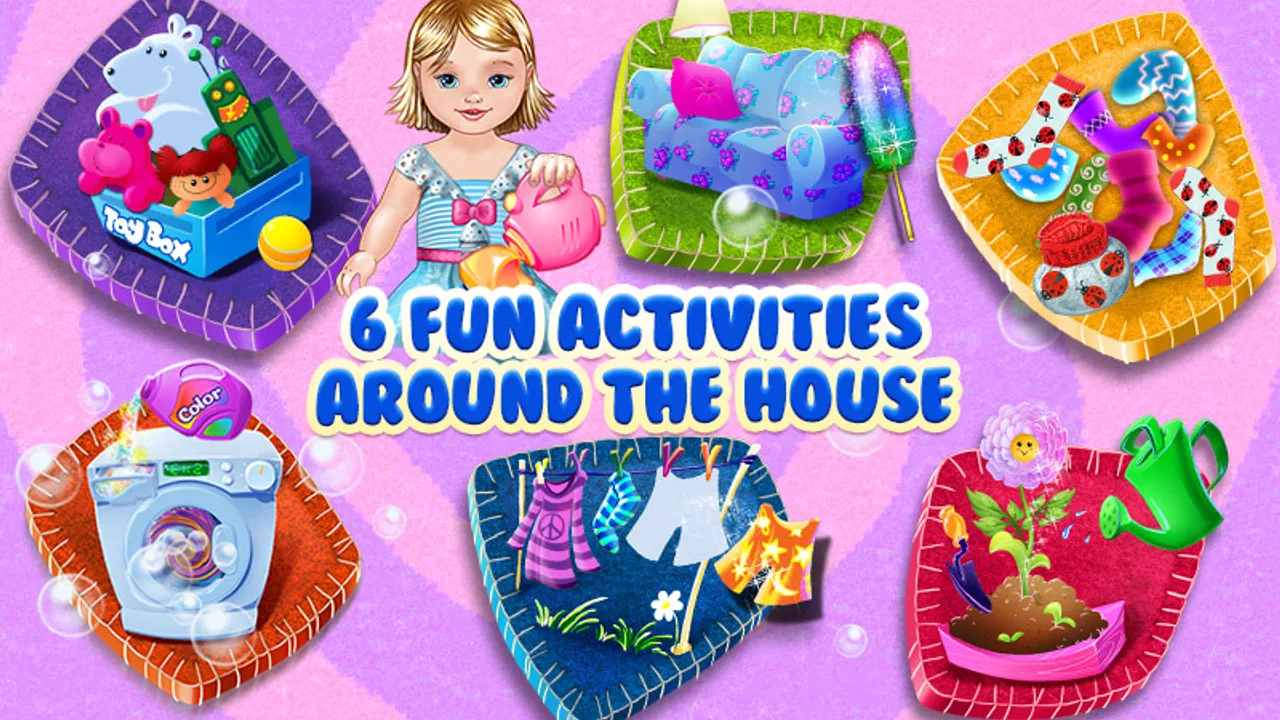
Baby Home Adventure Kids' Game
- 3.7
- Rating
- 5.00M
- Installs
- Free
- Price

 Analysis by App-foxy
Baby Home Adventure Kids' Game is the kind of educational game I would open with a young child when the goal is simple play with a light connection to everyday responsibilities. Instead of presenting learning as a worksheet or quiz, it turns helping around a home into the central idea. That makes the first few minutes easy to understand: choose an activity, interact with what is on screen, see an immediate response, and decide whether to try another small task.
My overall impression is that its appeal comes from this gentle action-and-reaction rhythm rather than from deep strategy. The game is free to start, is marked for Everyone, and comes from TabTale, a developer with a broad catalogue of child-focused mobile experiences. It has reached more than five million installs, so it is clearly familiar to many families. Still, I would not confuse popularity with unlimited replay value. This is best approached as a short, supervised activity for younger players, not as a large adventure game with layers of progression.
How the home activity becomes a playable loop
I find the loop most useful when I give a child a tiny goal before opening the game, such as noticing what a household task involves rather than simply tapping through. That keeps the activity focused without turning it into a lesson or test. Once the child understands the pattern, I can shift attention to how to prepare the device and session so the play stays calm and uninterrupted.
You May Also Like

 Blood Strike: 2.5 Anniversary
Blood Strike’s Loadouts Turn Every Drop Into a Tactical Gamble
A close look at Blood Strike’s custom loadouts: how fast access to signature weapons reshapes its battle royale rhythm, rewards preparation, and narrows the gap between fights.

 Pandora - Music & Podcasts
Pandora’s Music Is Easy to Start, but Harder to Recover
Pandora’s strength is its low-effort path from a seed to a station. Its weak spot is how much confidence it asks you to place in connection, setup, and quiet recovery.

 8 Ball Pool
 Is Built on Rivalries, Rematches, and Routine
A close look at the rivalries, rematches, shared routines, and unanswered safety questions that turn a quick pool match into a persistent mobile community.

 Samsung Music
’s Quiet Strength Is Playing What You Already Own
Its reach comes less from spectacle than from dependable access to a personal library. That simplicity is both the app’s strongest retention engine and its ceiling.

 AccuWeather: Weather Radar
AccuWeather Review: A Quick, Clear Forecast for Everyday Decisions
For everyday plans, the best forecast is the one you can understand quickly. AccuWeather makes rain timing, radar, and local conditions easy to act on, with a few trade-offs.

 Hill Climb Racing
Why Hill Climb Racing Still Turns Crashes Into One More Run
A tiny car, a bumpy hill and one more upgrade: Hill Climb Racing keeps resurfacing because its simple chaos makes every near-miss feel personal.
More From Our News Desk



The first action is deliberately easy to understand
What worked for me is that the game does not require a child to learn complicated controls before doing anything useful. The basic appeal is immediate interaction with household situations. A child can recognize the idea of helping at home, then tap and explore without needing to understand a long story or a complicated menu system.
That matters for the intended audience. Young children often lose interest when an app begins with too much reading, too many instructions, or an abstract lesson. Here, the theme gives the interaction a familiar frame. The player is not solving a detached puzzle; they are taking part in a playful version of home life. I found that this makes it easier for an adult to explain what is happening in a sentence or two.
The strongest use case is a short shared session. For example, after a child has watched a parent tidy a room, you can open the game and connect the on-screen activity with that real-world moment. The child can try the digital version first, then perhaps help place toys away afterward. The game does not replace that real task, but it can make the idea feel less like an order and more like a small challenge.
I would keep expectations realistic, though. The interaction is designed to be accessible, not demanding. Children looking for fast movement, difficult puzzles, or a large world to explore may find the opening too gentle. That is not a flaw for its target audience, but it is an important distinction when comparing it with action games or more structured learning apps.
Feedback keeps the child moving forward
The next part of the loop is the feedback. A child performs an action, receives a visible or audible response, and understands that the action mattered. That quick confirmation is more important here than complex rules. It gives the player a reason to continue without requiring constant adult explanation.
In my experience, this kind of feedback works best when the child is still developing patience and coordination. A response arrives soon enough to connect the tap with the result. That connection can encourage experimentation: if one interaction produces a reaction, the child naturally wants to see what another object or activity will do.
There is also a useful difference between this and a standard educational quiz. A quiz usually asks for a correct answer, while this game focuses more on participation. That makes it less intimidating for a child who is not ready to read independently. It also means the learning value is informal. The player is absorbing ideas about routines, actions, and consequences rather than practicing a clearly measured academic skill.
Parents should therefore treat the feedback as a conversation starter, not as proof that the child has mastered household habits. I would ask questions while playing: “What should we do next?” or “Where would this belong at home?” Those prompts turn a simple tap-based interaction into a chance to build vocabulary and connect play with real behavior.
Small rewards explain why another session begins
A good children’s game needs to make the next action feel worthwhile. Baby Home Adventure does that through the satisfaction of completing a small activity and seeing the playful result. The reward is less about long-term competition and more about the feeling that a task has been finished successfully.
That is a sensible choice for this theme. If the game pushed hard rankings or complicated achievement systems, it could distract from the home-helping idea. Instead, the immediate reward supports the central loop: act, receive feedback, and feel ready to try one more thing.
The trade-off is that children who need a strong external goal may eventually ask what comes next once the novelty fades. This is where an adult can add variety without pretending the game is deeper than it is. One session can focus on discovering interactions, while another can focus on naming objects or comparing the digital activity with a real routine. The same content can support different conversations, even if the underlying play remains familiar.
I also think the reward structure is better suited to brief play than to long uninterrupted sessions. A child can enjoy a few activities, feel successful, and stop before becoming overstimulated. If you are looking for an app that occupies a child independently for a long stretch, this may not be the right choice. Its most useful role is as a small shared experience or a calm transition between activities.
Resetting gives the loop its repeat value
After a child has explored the available activities, the important question is why they would return. The answer is not a dramatic plot twist. The appeal comes from repeating familiar actions, trying them again with more confidence, and sometimes approaching them with a different conversation or goal.
That reset is both the game’s strength and its limitation. Repetition is valuable for young players because it makes controls predictable and lets them practice without pressure. A child who needed help at first may become more independent after a few sessions. The familiar structure can also be comforting when a child wants something they already understand.
On the other hand, older children may notice the boundaries quickly. If they expect new levels, increasingly difficult challenges, or a substantial narrative, the reset may feel shallow. I would recommend it more readily to preschool-age players and families seeking simple guided play than to children who already prefer complex game systems.
One practical tip is to avoid presenting every session as a test. Let the child choose an activity, then stop while the experience is still pleasant. Returning later works better when the game remains associated with a positive, manageable routine rather than with pressure to complete everything in one sitting.
What the educational value really looks like
The educational category here should be understood broadly. Baby Home Adventure is not a replacement for a reading tutor, a mathematics app, or a formal early-learning program. Its value is in modeling everyday participation through play. It can support recognition, sequencing, simple decision-making, and discussion about what people do in a home.
That makes it especially suitable for adults who want to introduce the idea of helping without turning the conversation into a lecture. I could see it fitting into a family routine before bedtime, during a quiet afternoon, or while an adult is nearby and able to talk through the actions. The game provides the prompt; the adult supplies the deeper explanation.
There is a subtle benefit in the way the theme lowers the distance between screen activity and real life. Many children’s games use fantasy settings, which can be wonderful but sometimes leave the learning connection vague. Here, the home setting gives parents an obvious bridge. After playing, you can point to a real object and ask the child to identify a similar responsibility outside the screen.
The limitation is equally clear: the game’s lessons are not likely to feel systematic. If your priority is phonics, counting practice, spelling, or a curriculum with visible stages, a dedicated learning app will be a better fit. This title is more about playful context than measurable instruction.
Controls, supervision, and the free starting point
Because the game is free, it is easy for a family to try without committing money first. That is useful when you are unsure whether a child will connect with the home-adventure theme. The experience is intended for Everyone, which also makes it approachable for a broad family audience.
There are in-app purchases ranging from under one dollar to several dollars per item. I would keep that in mind before handing the device over for unsupervised play. Even when the core activity is suitable for children, purchase prompts can interrupt the experience or create an awkward moment if a child assumes every visible option is available.
My practical advice is to explore the game yourself before introducing it. Check how the child reaches additional content, decide what you are comfortable making available, and establish a simple rule about purchases. This takes only a short time and makes the session calmer. It also lets you judge whether the free portion offers enough variety for your child before spending anything.
The game runs on devices using iOS or Android 7.0 and later, and the current version is 1.1.6. That makes compatibility fairly approachable for families using older supported devices, although the actual feel will still depend on screen size and performance. A larger tablet is likely to be more comfortable for small hands than a compact phone, especially when a child is learning where to tap.
Where it fits beside other children’s games
Compared with a typical preschool quiz, Baby Home Adventure feels less academic and more situational. There is less emphasis on selecting a right answer and more on exploring a familiar setting. That makes it a stronger choice when the child resists lesson-like apps, but a weaker choice when a parent wants clear progress in a specific school skill.
Compared with open-ended digital play, it offers more direction. A child is not simply given a blank space and left to invent everything. The home-helping theme gives the session a purpose, which can make it easier for a parent to join in. The trade-off is that it may not offer the same creative freedom as a sandbox-style app.
Compared with a long-form adventure game, it is much lighter. There is no reason to expect elaborate exploration or a demanding challenge curve. That simplicity is exactly why it can work for a quick activity, but it also explains why older or more experienced players may move on quickly.
The best comparison, in my view, is with a digital picture book that invites interaction. It gives a child a setting, a theme, and a sequence of small responses. If you want a calm introduction to interactive play with an everyday-life angle, it makes sense. If you want deep replayability, extensive customization, or a structured academic program, another category of app will serve you better.
Small details that improve the experience
One useful approach is to play the first session alongside the child rather than judging it from a distance. Watch which actions they understand immediately and which ones need explanation. That tells you whether the game is matching their developmental level more accurately than the age label alone.
A second tip is to use the game as a transition tool. A short session before a real household activity can provide a gentle lead-in, while playing afterward can help the child talk about what they just did. The important part is keeping the connection concrete. Asking a child to help with one small real task is more effective than claiming that the game itself teaches responsibility.
A third insight is that repetition can be used intentionally. Instead of letting the child rush through the same actions, invite them to narrate each step or predict the response before tapping. This adds language and reasoning practice without changing the game. It also gives a child who already understands the controls a new challenge.
Finally, I would use the purchase system as a boundary-setting opportunity. Let the child know that some options may require an adult decision, and make that decision before the session becomes exciting. This avoids turning a playful reward moment into a negotiation over paid content.
Who should try it and who should skip it
I would recommend Baby Home Adventure to parents of young children who want a simple, friendly game connected to familiar routines. It is particularly suitable when an adult can sit nearby, ask questions, and connect the digital activity with real life. It can also work for a child who is new to mobile games and benefits from immediate responses instead of complex controls.
I would be more cautious if your child becomes frustrated by repetition or expects a clear series of increasingly difficult stages. The same gentle loop that helps a beginner can feel limited to a player seeking challenge. I would also skip it if your main goal is a formal learning outcome such as reading fluency or number practice; a purpose-built educational app would be more precise.
The rating sits at about 3.7 from roughly thirty-seven thousand ratings, with around two thousand written reviews. I read that as a sign of a recognizable but not universally loved experience: enough families find the concept worthwhile, while the modest average suggests that expectations matter. Its audience is narrower than the broad Everyone label might imply because the simplicity is aimed most naturally at younger children.
My verdict on the action-feedback-reward-reset loop
Baby Home Adventure Kids' Game succeeds when I treat it as a short, interactive introduction to helping at home. The first action is clear, the feedback arrives quickly, the reward encourages one more activity, and the reset makes it easy to return without relearning the controls. That loop is coherent and appropriate for a young audience.
Its weaknesses are the same qualities that make it approachable. The play can become repetitive, the educational value is informal rather than academic, and in-app purchases mean an adult should manage the device before a child plays alone. Those are real considerations, not reasons to dismiss the game outright.
For a free trial with a familiar theme, I think it is worth exploring with a child, especially on a tablet and in short sessions. I would recommend it as a conversation tool and a gentle introduction to interactive routines, not as a complete learning platform or a substitute for real chores. The best results come when the screen action ends with one small real-world action. That is where the game’s simple loop becomes genuinely useful: play creates interest, interest opens a conversation, and the conversation can lead naturally back to everyday life.
FAQs for Baby Home Adventure Kids' Game
01What is Baby Home Adventure Kids' Game about?
Baby Home Adventure Kids' Game is a child-friendly pretend-play experience centered on exploring a colorful home and interacting with everyday objects. Children can move between rooms, discover activities, and use simple tap-and-drag controls to play at their own pace. The game focuses more on imaginative exploration and familiar routines than on competition, difficult objectives, or fast reactions.
02Is Baby Home Adventure Kids' Game suitable for young children?
The game is designed with young children in mind, offering bright visuals, approachable interactions, and a relaxed play style. However, the ideal age can vary depending on a child’s reading ability, attention span, and familiarity with mobile controls. Parents should review the store listing, age rating, and available content before downloading, especially if the device will be used without supervision.
03Does Baby Home Adventure Kids' Game require an internet connection?
Many home-exploration activities may be playable offline after installation, which is useful for travel or areas with limited connectivity. Nevertheless, some features—such as advertisements, additional downloads, updates, or purchase verification—may require internet access. It is best to launch the game once while connected, check which sections are available offline, and confirm the current requirements on the Android or iOS store page.
04Are there advertisements or in-app purchases in the game?
Parents should check the current listing carefully because monetization can differ between versions, platforms, regions, and updates. Some editions of children’s games include advertisements, optional purchases, or locked content. Before handing over the device, review the game’s purchase settings, enable parental controls, and use a password or authentication requirement for transactions to prevent accidental taps from creating unwanted charges.
05Is Baby Home Adventure Kids' Game safe for children to play independently?
The game appears intended as a gentle entertainment app, but independent play should still be approached thoughtfully. Parents should inspect permissions, privacy information, advertising behavior, and any external links before allowing unsupervised access. It is also wise to disable purchases, limit screen time, and play together initially so you can understand the controls, content, and whether the experience suits your child.
Pros
- Simple controls make it easy for young children to play independently.
- Bright animations and friendly characters create an inviting experience.
- Short activities suit toddlers with limited attention spans.
- Offline play is convenient for travel and areas without internet access.
- Gentle gameplay avoids stressful challenges and competitive pressure.
Cons
- Some activities may feel repetitive after extended play sessions.
- Limited difficulty can make the game less engaging for older children.
- Frequent sound effects may become distracting in quiet environments.
- Parents may want more settings for adjusting audio and gameplay.
- In-app content may be limited compared with larger educational game suites.

Baby Home Adventure Kids' Game
Gallery